 Keen
Get Keen
Relaxed brain and memory games for 50 and 60 year olds
Start with untimed games that practise everyday tasks: recall a shopping list, match names to faces or retell a short story. Choose readable text and a pace you can control; the six activities below need no app.
Many brain games are built for speed: bright colours, ticking clocks, scores that drop if you pause. That is fun for some people and stressful for others. Here is what makes a good memory game after 50, six games you can play today with no app at all, and how to choose a phone game for yourself or for a parent.
What makes a good memory game after 50?
- It trains memory you actually use. Lists, names, numbers, where things are. Not just reaction speed.
- You set the pace. A timer should be optional, not the point.
- It is easy to read. Large, clear text and calm screens.
- It gets harder slowly. Just enough of a stretch to keep it interesting.
- It is short. Ten minutes you will really do beats an hour you won't.
Which six memory games can you play without an app?
- The market list. "I went to market and bought apples." The next person repeats it and adds one: "apples and bread". Keep going until someone slips. Great with grandchildren.
- The tray game. Put 12 small things on a tray, look for one minute, cover it, then write down what you saw. Next time, someone takes one away and you say what is missing.
- Matching pairs. Lay cards face down and turn two at a time to find pairs. Start with 16 cards, then use more.
- Number repeat. Someone reads out digits, you say them back. Start with 4 and add one each round. Then try saying them backwards.
- Category A to Z. Pick a category (fruit, towns, film stars) and go through the alphabet. Take turns, no rush.
- What did they wear? After meeting friends, recall what each person wore and one thing they said. Check next time you see them.
Which memory games can you play without a timer?
Plenty of people search for memory games for 60 year olds with no timer, and it is easy to see why. A countdown turns a simple question into a test, and the pressure makes it harder to think.
- Less pressure. You think about the answer, not the clock.
- Closer to real life. Remembering a name or a shopping list rarely comes with a countdown.
- Easier to keep going. A calm ten minutes is easier to do every day.
Play matching pairs here, with no timer
This is the old card game on screen. Tap a card to turn it over, then tap another. If the two words match, they stay up. If they do not, both stay showing until you tap again, so you can take as long as you like to remember where they were. Nothing counts down. The only number is how many turns you took, and you can ignore that too.
Cards:
Start with 12 cards. When you can clear them in about ten turns, move up to 16. It saves nothing and needs no sign-up.
Try one now, on paper. Read this list once, cover it, then write it down in reverse order. Take as long as you like: lemon, bus, candle, river, glove. That is the idea behind Reverse Recall. For more, see our memory exercises to do at home or the free memory test.
How Keen's relaxed mode works. Relaxed mode turns off every countdown in the app. Reverse Recall and Number Patterns have untimed rounds. Calm mode keeps movement gentle. The eight games have 20 levels each and get harder only as you get better.
How do you choose a memory app for an older parent?
If you are setting something up for a parent, the app's best features matter less than whether they can use it alone on a Tuesday morning. Look at setup, account and text size first.
Setup. Install it together and play the first round side by side. Check that the buttons are easy to tap, that the first screen explains itself, and that nothing moves or flashes.
Account. Many apps ask for an email address and a password. Write them down somewhere safe, or use a password manager. Check what happens when a free trial ends, so there is no surprise charge.
Text size. Look for a text size setting inside the app, not only in the phone settings. Ask your parent to read a line aloud before you decide.
Then use this list to judge any app, ours included:
- Text you can read. A text size setting inside the app is better than relying on the phone alone.
- No countdown clocks. Check that you can turn timers off, or that the games have none.
- No ads. Ads are confusing, and easy to tap by mistake.
- Privacy. Look for an app with optional usage analytics. This matters most when you set it up for someone else.
- Real-life practice. Names, shopping lists, PINs, where you put your keys. Practice that looks like real life is easier to use.
What an app can and cannot do. An app can give you a calm, daily habit of practice for everyday tasks. It cannot diagnose, treat or prevent memory loss or dementia, and no honest app will promise that. If memory problems affect daily life, talk to a doctor.
How does Keen approach daily practice?
Disclosure: we make Keen. It is Android only, the first day's plan is free and then Premium is needed, and it has a narrower game set than the big brain training apps. Each day gives you one game, one real-life lesson, a short Side Vision exercise and a check-in, with no ads and honest progress based on real-life scores rather than a made-up brain age.
Is forgetting more normal now?
Everyday slips happen at every age, and more when you are tired, busy or stressed. The NHS advises seeing a GP if memory problems affect your day-to-day life (NHS: memory loss). This guide is about everyday practice. It is not a test and not medical advice.
Questions
What are good memory games for 60 year olds?
Games that use everyday memory and let you go at your own pace: remembering a list, matching pairs, repeating a number, naming things in a category. Large text and no countdown help too.
Are there memory games without a timer?
Yes. Play the matching pairs game on this page, which has no clock at all, or the paper games above, or use an app with a relaxed mode. In Keen, relaxed mode turns off every countdown, and Reverse Recall and Number Patterns are untimed by design. We make Keen, so weigh our view with that in mind.
How do I choose a memory app for seniors?
Start with what they will actually use: text they can read, no countdown clocks, no ads, optional usage analytics, and practice that looks like real life. Set it up together, check the text size in the app and on the phone, and expect an account and a subscription after any free trial. We make Keen, so weigh our view with that in mind.
Do brain games prevent dementia?
No game can promise that, and Keen makes no health claims. Play because you enjoy it and because practice makes everyday tasks easier. If memory problems affect your daily life, talk to a doctor.
How do I improve my memory at 60?
Use simple methods on real tasks: say a new name back, turn a list into a story, break numbers into pieces, and put things in the same place each time. Keep moving, sleep well and stay in touch with people. If memory problems affect your daily life, talk to a doctor.
What games are good for 60 year olds?
Games you enjoy and can play at your own pace: matching pairs, the tray game, word and category games, cards, and phone games with a relaxed mode and no timers. Playing with family or friends adds talk, which helps too.
Related
- Brain training apps for adults, compared
- A calmer Lumosity alternative
- Memory exercises for adults (printable, 5 minutes)
- Free memory test (3 minutes, not a medical test)
- How to remember birthdays, dates and phone numbers
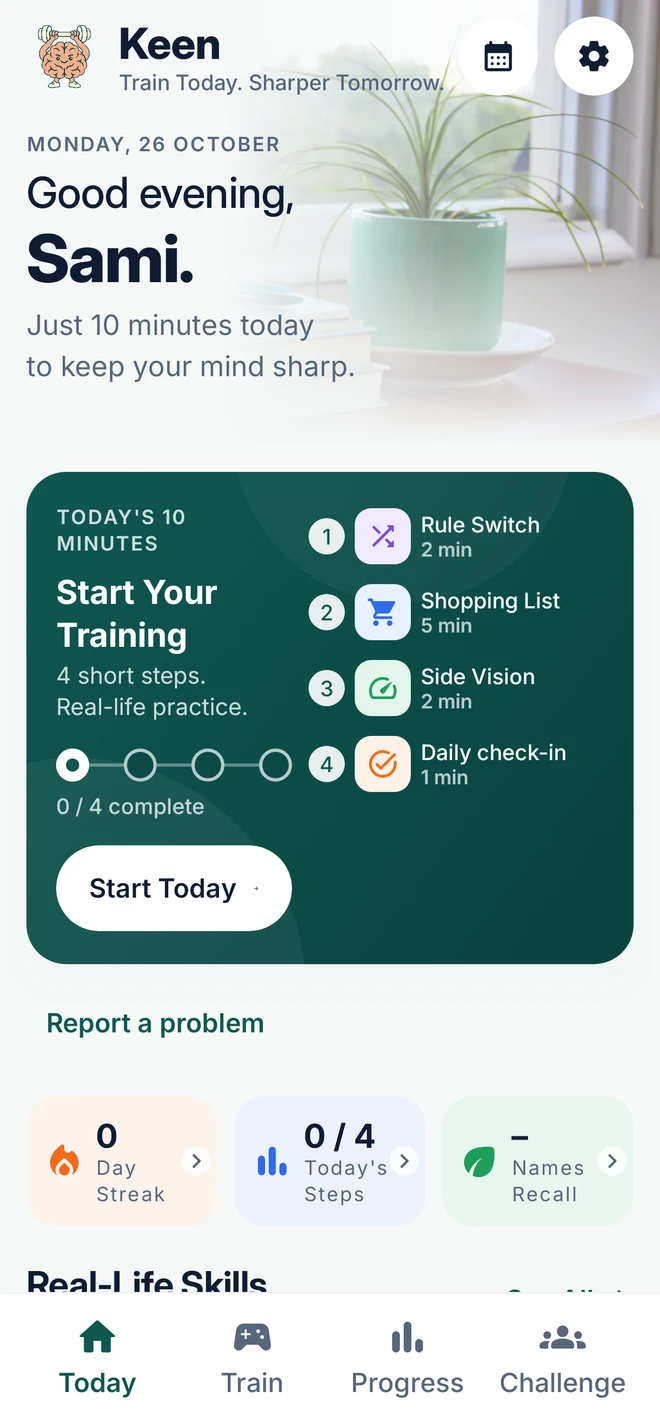
Practise it ten minutes a day
Keen is an Android app with ten calm minutes a day for adults 40 and over: one game, one real-life lesson, a short Side Vision exercise and a check-in. No ads, and relaxed mode with no timers.